𝗖𝗼𝗻𝘃𝗲𝗿𝘀𝗶𝗼𝗻 𝗧𝗿𝗮𝗰𝗸𝗶𝗻𝗴 𝗚𝗧𝗠 𝗧𝗿𝗶𝗴𝗴𝗲𝗿 𝘃𝗶𝗮 𝗧𝗵𝗮𝗻𝗸-𝗬𝗼𝘂 𝗣𝗮𝗴𝗲 𝗨𝗥𝗟
Most service-based websites track conversions by using the thank-you page URL as the trigger.
Here’s what happens with this setup:
When a user submits a lead form and lands on the thank‑you page, the conversion tag fires correctly.
However, if the same user reloads the page, the tag fires again.
This can lead to multiple conversion counts for a single user.
𝗛𝗼𝘄 𝘁𝗼 𝗳𝗶𝘅 𝘁𝗵𝗶𝘀 𝗽𝗿𝗼𝗽𝗲𝗿𝗹𝘆:
Go to Google Tag Manager.
Create a Custom JavaScript Variable.
Paste the following code into the variable:
javascript
function() {
return performance.navigation.type === 1;
}
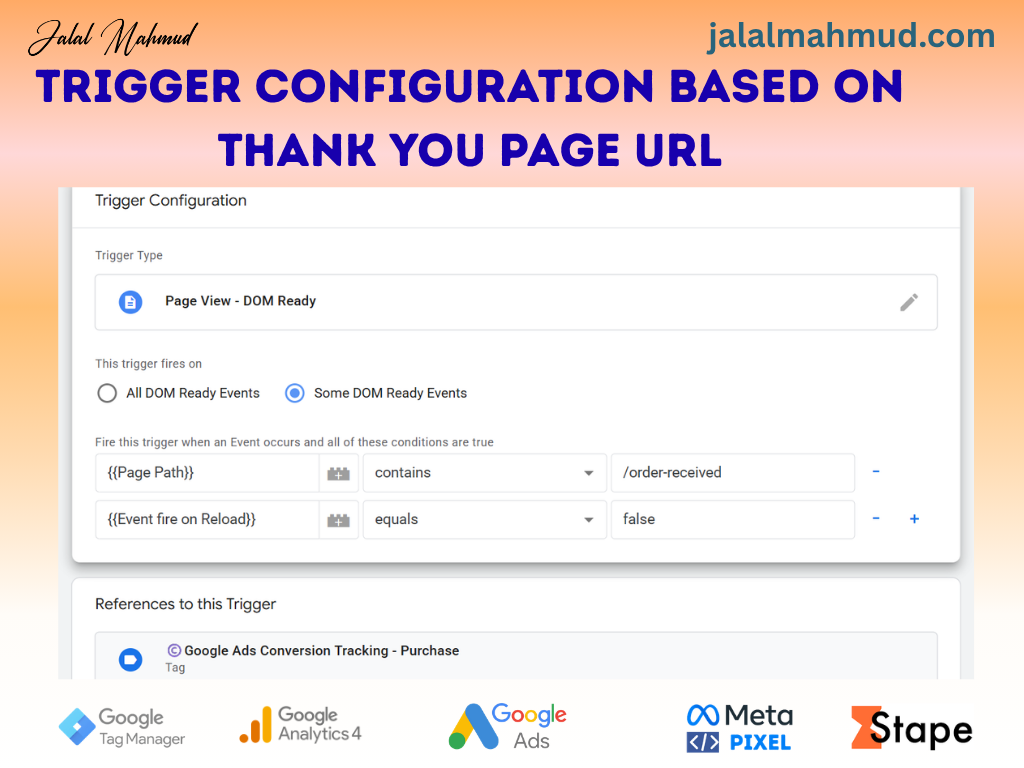
Open your Trigger Configuration.
Add a condition:
{{your_variable_name}} equals false
How it works:
The conversion fires only once — when the user first lands on the thank‑you page.
If the same user reloads the page, the conversion will not fire again.
Now, take a moment to think:
How many of this month’s reported “leads” were actually just the same person refreshing the page?
Check your GTM setup and let me know if you need any help.
#googletagmanager #gtmtips #conversiontracking #googleads #ppc #webanalytics #performancemarketing #leadgeneration #digitalmarketingtips #marketinganalytics #dataquality #adstrategy #b2bmarketing #cro#Googleanalytics #googleads #metapixel #FacebookPixel