

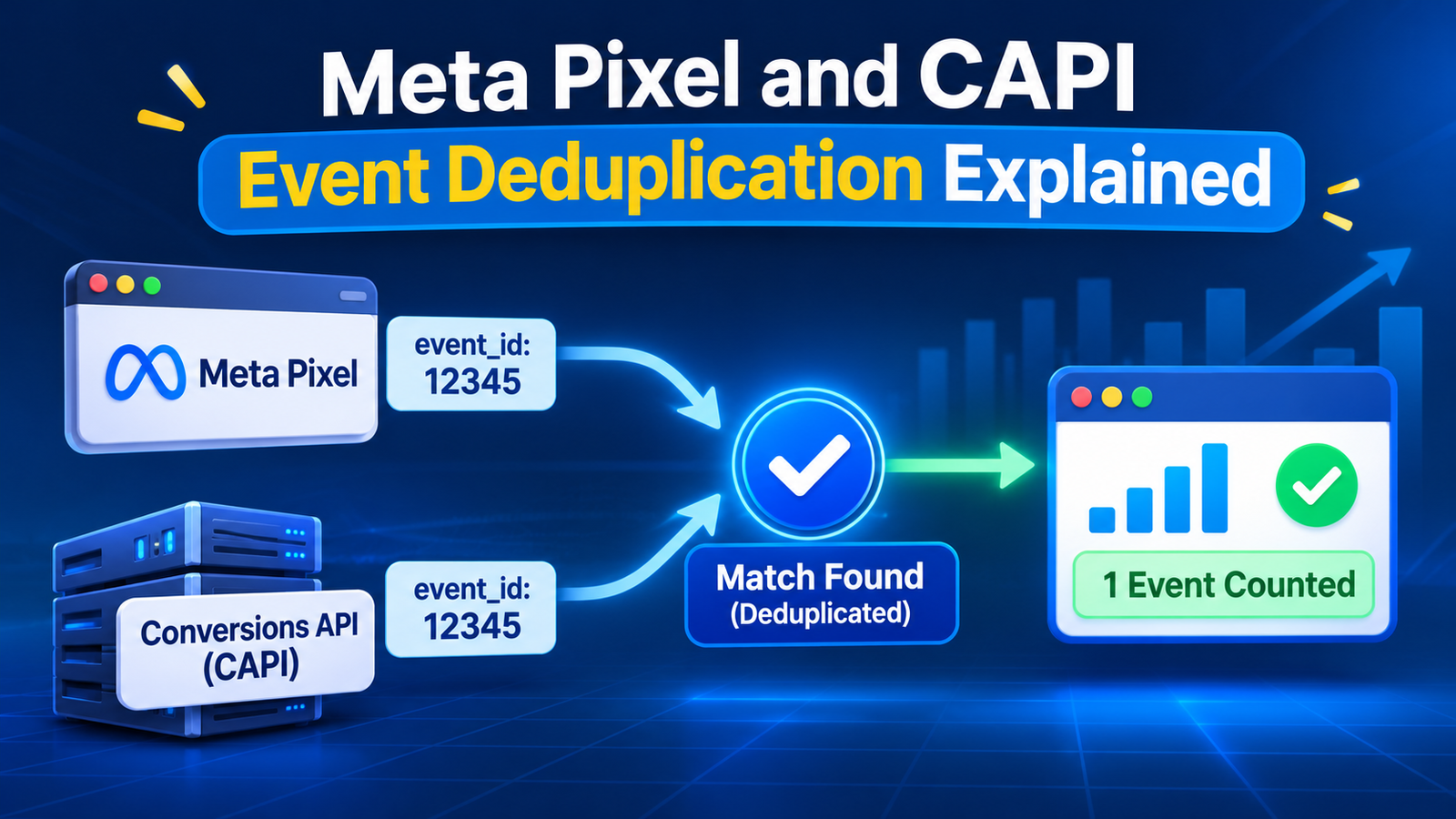
Seeing double purchases in Meta Ads Manager? Learn how Meta Pixel and Conversions API deduplication works, what event_id does, and how to fix duplicate events step by step.
Quick answer: Meta Pixel and CAPI event deduplication is the process where Meta counts one conversion when the same customer action is sent twice, once from the browser (Pixel) and once from your server (Conversions API). It works when both events carry the same event name and the same event ID (eventID in the Pixel, event_id in CAPI), and Meta receives them within 48 hours of each other. If either value is missing or different, Meta counts both events.
If you recently added the Conversions API (CAPI) to your Pixel, your purchase numbers may have suddenly jumped. That is usually not a sign of better tracking. It is a sign that Meta is counting the same order twice. This guide explains how deduplication works, how to set it up correctly, and how to check that it is working.
If you are still setting up server-side tracking, start with our guide on Meta Conversions API setup with GTM server-side and come back here to make sure your events are deduplicated.
Key Takeaways
- Run Pixel and CAPI together for the best coverage, but only if you deduplicate.
- Deduplication needs two matching values: event name and event ID.
- Meta keeps the first event it receives and discards the matching one that follows within 48 hours.
- Reusing the same event ID for two different actions can make Meta drop a real conversion.
- Check Events Manager → Overview → Event deduplication to confirm it works.
What Is Event Deduplication in Meta?
Event deduplication is how Meta recognises that two events describe the same customer action and counts it only once. It matters because the recommended setup is redundant: the browser Pixel and the server-side Conversions API both send the same events. Redundancy helps you recover conversions lost to ad blockers, browser restrictions and dropped connections, but without deduplication every redundant event is counted twice.
Meta’s own guidance is that you only need deduplication for events you send through both channels. If an event is sent only by the Pixel or only by CAPI, there is nothing to deduplicate.
Why Do Duplicate Events Happen?
Cause | What goes wrong |
No event_id on one or both sides | Meta has no way to link the browser event and the server event |
Different event names | Purchase from the Pixel and purchase from the server are treated as two events |
Different event IDs | The Pixel and CAPI each generate their own random ID |
Both a Shopify app and a manual setup | Two tools send the same event through the same channel |
Server event delayed beyond 48 hours | The match window has passed, so both events are counted |
Reused IDs for different actions | A real conversion can be dropped as a false duplicate |
How Meta Pixel and CAPI Deduplication Works
Meta uses two methods. The first is the one you should always aim for.
Method 1: event_name + event_id (recommended)
For Meta to treat a browser event and a server event as the same, these two conditions must be true:
- The Pixel eventID equals the Conversions API event_id.
- The Pixel event name equals the Conversions API event_name.
When Meta finds a match within 48 hours, it keeps the first event it received and discards the other.
Method 2: fbp and external_id (fallback)
If you cannot send an event_id, Meta can try to deduplicate using the event name plus the fbp (browser ID cookie) and/or external_id parameters, as long as you send them consistently from both the browser and the server. Treat this as a backup. It is less precise than a shared event ID, and Meta’s documentation recommends the event ID method.
Does order matter?
Yes. Deduplication works best when the browser event arrives first and the server event follows. Meta states that a server event is not discarded if it has not seen a matching browser event in the previous 48 hours, even if an identical browser event arrives afterwards. In practice, send the server event right after the browser event and never batch it hours later.
How to Set Up Deduplication Step by Step
Step 1: Decide How You Will Create the Event ID
The ID must be unique for each customer action and identical on both channels.
Event | Good event ID | Why |
Purchase | purchase_<order_id> | The order ID is the same in the browser and on the server, and it is unique |
Lead / form submit | A random ID created once at submission | Generate it once, then pass the same value to the browser and the server |
AddToCart, ViewContent, PageView | A random ID created in the browser at the moment of the event | The server receives the same value from the browser request |
For non-purchase events, never create one ID in the browser and a different one on the server. Create it once and pass it along.
Step 2: Send eventID with the Meta Pixel
With the standard Pixel code, the event ID goes in the fourth argument of fbq(‘track’):
fbq(‘track’, ‘Purchase’, {
value: 129.99,
currency: ‘USD’
}, {
eventID: ‘purchase_10452’
});
Step 3: Send the Same event_id with the Conversions API
In the server event, use the same name and the same ID:
{
“data”: [
{
“event_name”: “Purchase”,
“event_time”: 1762300000,
“event_id”: “purchase_10452”,
“event_source_url”: “https://yourstore.com/checkout/thank-you”,
“action_source”: “website”,
“user_data”: {
“em”: [“<hashed email>”],
“client_ip_address”: “<ip>”,
“client_user_agent”: “<user agent>”,
“fbp”: “<_fbp cookie>”,
“fbc”: “<_fbc cookie>”
},
“custom_data”: {
“value”: 129.99,
“currency”: “USD”
}
}
]
}
The values for event_name and event_id must match the Pixel exactly, including capital letters and spacing.
Step 4: Do It in Google Tag Manager (Web + Server)
If you use GTM with server-side tracking, the setup follows the same logic:
- Create the event ID once in the web container. Push it to the data layer with the event (for a purchase, build it from the order ID).
- Add the ID to the Meta Pixel tag in the web container using the tag’s event ID field, so the browser event carries eventID.
- Send the same ID to the server container with the event data. For GA4-based setups, send it as a parameter on the event your server container receives.
- Map it in the server-side Meta CAPI tag. Most Meta CAPI tags, including the one from Stape, read event_id from the incoming event data. Confirm the field is mapped in your tag settings.
- Keep event names consistent. Make sure the Pixel tag and the CAPI tag send the same standard event name (Purchase, not purchase).
For the full server-side build, see our step-by-step guide for GTM server-side tracking with Stape.
Step 5: Shopify Stores
If your store runs on Shopify, use the order ID to build the event ID so the Pixel purchase and the server purchase always match. Also make sure only one tool sends each channel. A common mistake is running the native Facebook & Instagram app, a custom Pixel and a GTM setup together, which creates duplicates inside the same channel that no event ID can fix. For the purchase data itself, see our guide to tracking Shopify revenue with Google Tag Manager.
How to Check That Deduplication Is Working
- Open Meta Events Manager and select your Pixel or dataset.
- Go to the Overview tab and open an event such as Purchase.
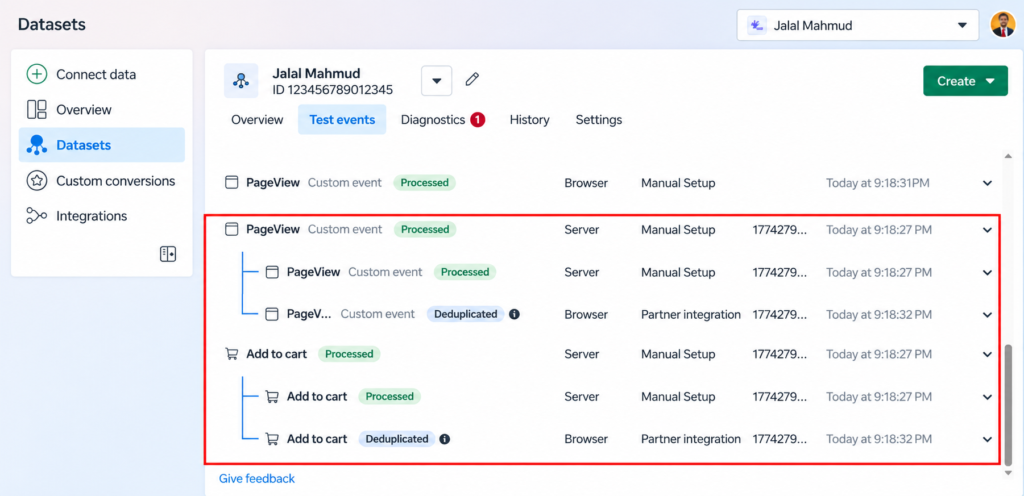
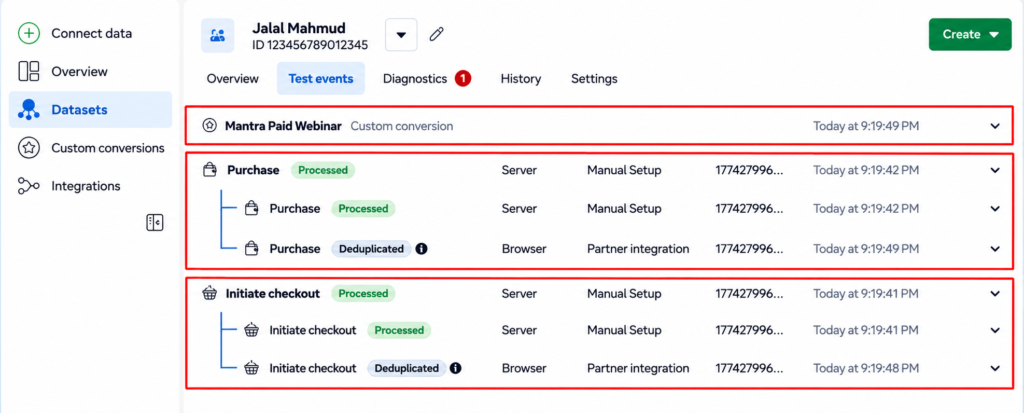
- Check that the event shows both Browser and Server as sources.
- Open the Event deduplication section to see how many events were matched and removed.
- Open the Diagnostics tab and look for warnings about missing event_id, duplicate events that are not being deduplicated, or wrongly formatted values.
- Use the Test events tool to fire a test purchase and confirm the browser event and server event show the same event ID.
- Compare Meta purchases with real orders in your store after a few days. They will not match perfectly, but Meta should not show far more purchases than you actually received.
What does a healthy setup look like? Both channels send the event, the same ID appears on both, and Events Manager shows a high share of events being deduplicated and no duplicate warnings in Diagnostics.
Common Deduplication Mistakes and Fixes
Problem | Likely cause | Fix |
Purchases doubled after adding CAPI | No shared event_id | Send the same ID from the Pixel and CAPI |
Deduplication still fails with IDs present | Event names differ in spelling or case | Use the exact same standard event name |
Real purchases missing in Meta | The same event ID reused for different orders | Make IDs unique per action (use the order ID for purchases) |
Server events not matched | Server event sent much later or in a delayed batch | Send the server event in real time, right after the browser event |
Duplicates only on one channel | Two apps or two tags send the same event through the same channel | Remove the extra tag or app |
CAPI event has no event_id | Field not mapped in the server tag | Map event_id from the incoming event data |
Test events look fine, live data does not | Test mode used a different ID format | Test a real order end to end and recheck Events Manager |

Frequently Asked Questions
What is event deduplication in Meta Pixel and Conversions API?
It is how Meta counts a conversion once when the same action is sent through both the browser Pixel and the server-side Conversions API. Meta compares the event name and event ID and discards the duplicate.
What do I need to deduplicate Meta Pixel and CAPI events?
Send the same event name and the same event ID from both channels. The Pixel parameter is eventID and the Conversions API parameter is event_id.
How long is the Meta deduplication window?
Meta deduplicates matching events that it receives within 48 hours of each other. If the second event arrives later than that, both are counted.
Does Meta keep the browser event or the server event?
Meta keeps the first event it receives and discards the later matching one. For best results, the browser event should arrive first and the server event should follow shortly after.
Do I still need deduplication if I only use CAPI?
No. Deduplication is only needed for events sent through both the Pixel and the Conversions API. Sending every event through one channel only means you lose the redundancy benefit, though.
Why are my Meta purchases higher than my real orders?
The most common causes are missing or mismatched event IDs, different event names between Pixel and CAPI, and more than one tool sending the same event. Check the Event deduplication section and the Diagnostics tab in Events Manager.
Can I deduplicate without an event_id?
Meta can sometimes deduplicate using the event name with fbp and/or external_id sent from both the browser and the server, but this is a fallback. Using a shared event ID is the recommended and more reliable method.
Final Thoughts
Running the Pixel and the Conversions API together is the right move for accurate Meta tracking, but only if each action is counted once. Give every action one unique event ID, send it through both channels with the same event name, send the server event quickly, and verify the result in Events Manager. Do that, and you keep the extra conversions CAPI recovers without inflating your numbers.
Need help getting Pixel, CAPI and GTM server-side tracking to work together correctly? Get in touch and I will help you set it up.
